
Manage Your Recommendation
Traditionally, when you want to open your recommendations, you will go to ‘Privacy And Settings’ and click ‘Manage Your Recommendations’.
On the new interface, you will notice that ‘Manage Your Recommendations’ is not on the settings anymore. Now, we will show you a LinkedIn tutorial for business with steps on how you can easily manage your recommendation:
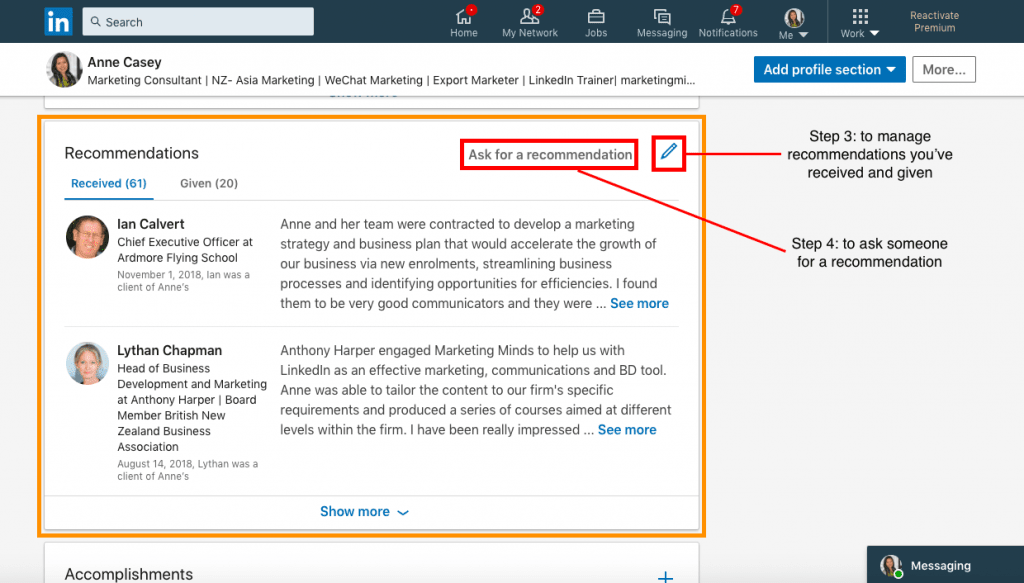
Step 1: Go to your profile
Step 2: Scroll down until you reach the Recommendation section
Step 3: Click the edit (pencil) icon on the section to manage the recommendation you’ve received and given
Step 4: Click ‘Ask for a recommendation’ if you want someone to give you a recommendation
Note: Nothing has changed on the format and features of the recommendation, so feel free to employ your own style when managing recommendations.
This is to give you a refresher why LinkedIn recommendations are important:
- Anyone that visits you knows you can be trusted.
- It shows your relevance within your chosen industry
- Recommendations show you are active on LinkedIn
- If you have a big claim on your profile, a good recommendation can back it up
- It shows your ability to build strong business relationships.
There are many more changes to learn about LinkedIn, so to find out more check out our LinkedIn Training Schedules.
If you’re interested in mastering LinkedIn here are the training courses available:
Customised LinkedIn Training – Please, drop us a line
Beginners – LinkedIn “Ready, Steady, Go!”
Intermediate – LinkedIn “For You and Your Business”
Advanced – LinkedIn “Like a Pro With Content Marketing”
Note: Your company may also qualify for NZTE subsidy with these workshops.
Email us or call 09 634 4390 for more information or if you are unsure which course is right for you.
Enjoyed this article and want more? Sign up now to our marketing snippets!